
Setting Up Voicemail-to-Email
Voicemail-to-email sends you an email notification with an audio attachment every time someone leaves a voicemail on your extension. This guide shows you how to set it up.
Last reviewed: October 2026
Setting Up Voicemail-to-Email, Step by Step
Select Voicemail in Your Call Flow
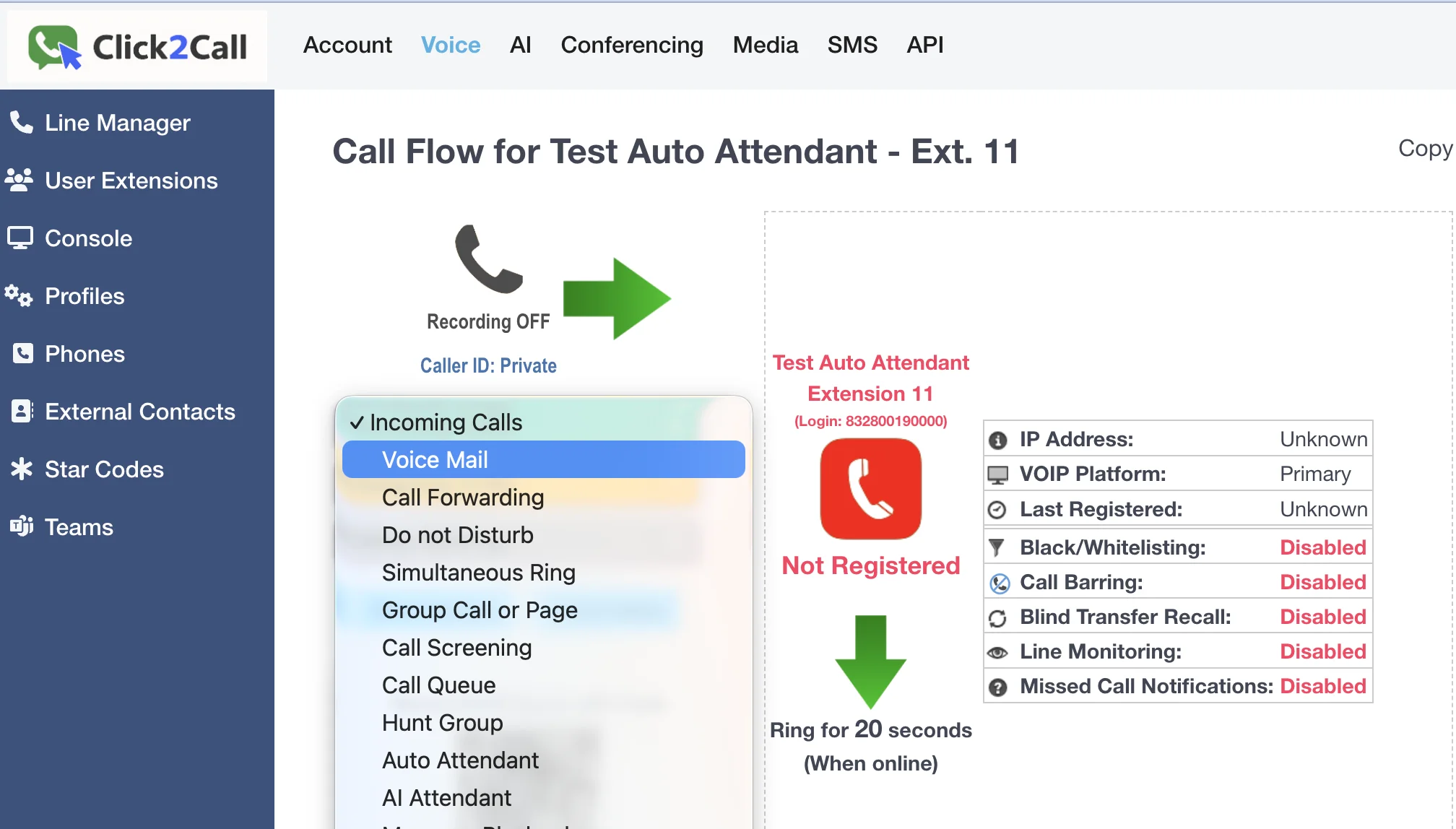
First, log in to the Click2Call portal. Navigate to the Voice tab and select the phone number or extension you want to configure from the Line Manager list. In the main call flow panel, click the Incoming Calls dropdown menu and select Voice Mail. This tells the system to direct unanswered calls to the voicemail service.
Configure Your Voicemail Settings
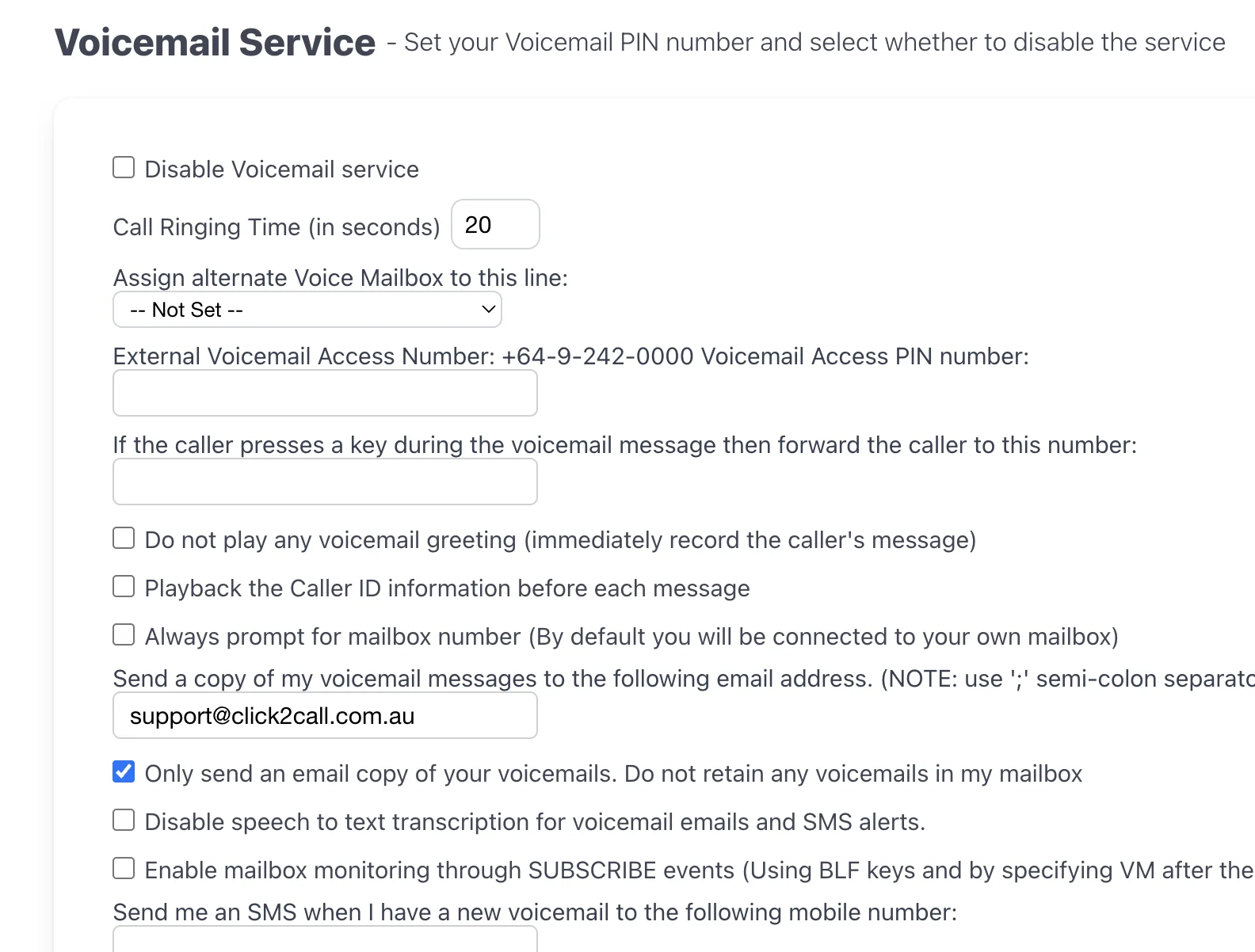
Once you select Voice Mail, the settings panel will appear. Here you can customise how your voicemail service works. We recommend the following at a minimum:
- Call Ringing Time: Set how long the phone rings before voicemail answers (e.g., 20 seconds).
- Voicemail Access PIN: Set a numeric PIN to access your messages from another phone.
- Send a copy to email: Enter one or more email addresses (separated by a semi-colon) to receive voicemail-to-email notifications.
- Only send an email copy: Tick this box if you do not want voicemails stored in the portal, only sent to your email. This is a popular option for keeping your mailbox clean.
There are many other advanced options available, such as speech-to-text transcription, SMS alerts, and automatically deleting old messages.
Set Up Your Voicemail Greeting
Scroll down to find the greeting options. You have two main choices:
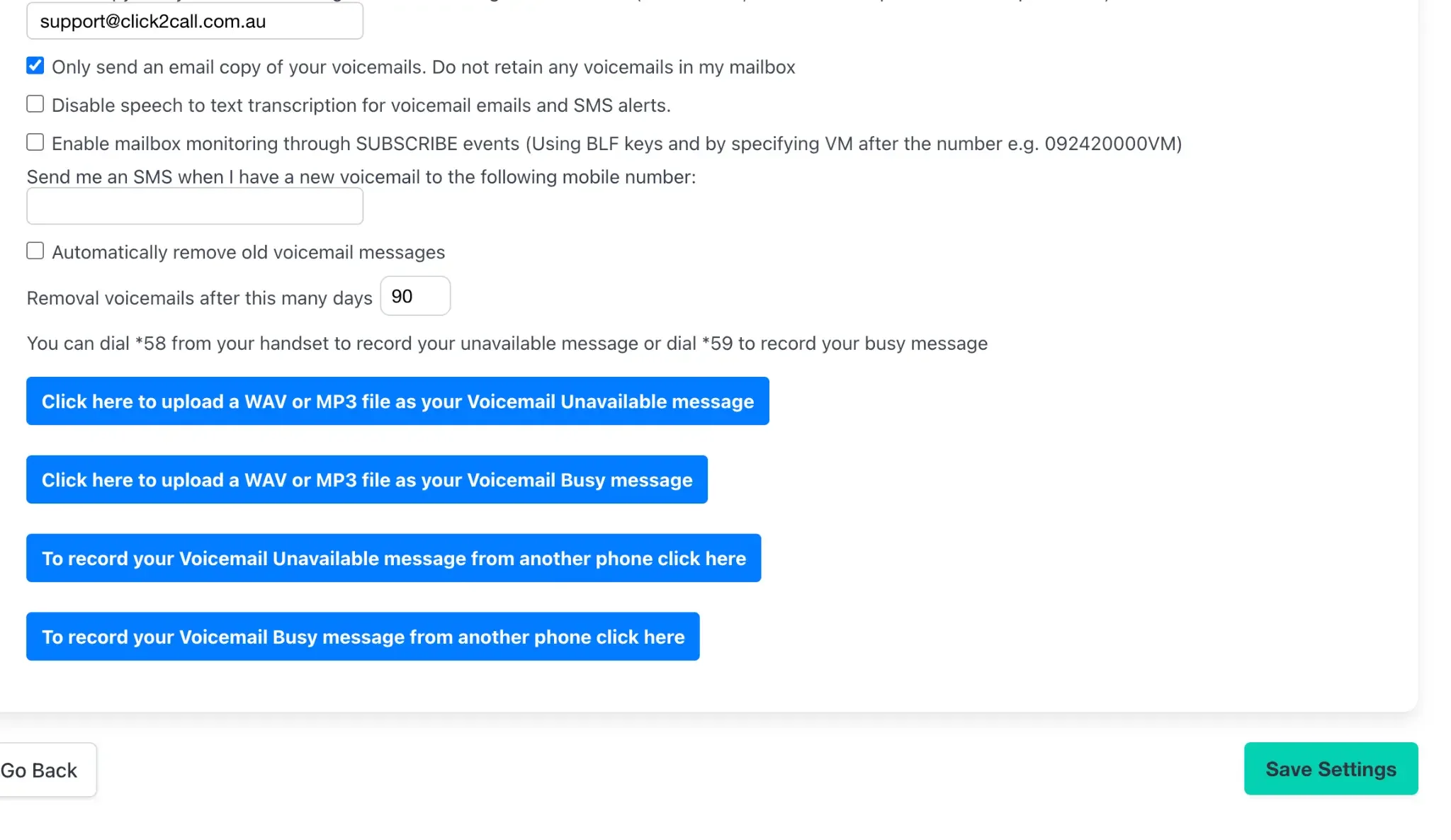
- Record from your handset: Dial *58 from your connected phone to record your 'unavailable' message (when you don't answer) or *59 for your 'busy' message (when you are on another call).
- Upload a file: Click the blue buttons to upload a pre-recorded WAV or MP3 file from your computer. This is ideal for professional studio recordings.
Pro Tip: You can use our AI Speech tool to generate a high-quality, natural-sounding greeting file to upload here.
Save and Test
Once you are happy with your settings, click the green Save Settings button at the bottom. To test, call your number from a different phone (e.g., your mobile), let it ring out, and leave a short message. Within a few minutes, you should receive an email with the audio file attached, along with an AI transcript and summary of the message — so you can read a voicemail at a glance without playing it back.
Every voicemail option
| Option | What it does |
|---|---|
| Disable Voicemail / AI Answer Agent service | Turns voicemail off for this number. |
| Send callers to the AI Answer Agent | The Answer Agent answers instead of the voicemail recording. |
| Call Ringing Time | Seconds the phone rings before voicemail answers. |
| Assign alternate Voice Mailbox | Messages go to another mailbox, such as a shared one. |
| External Voicemail Access Number | Call +64 9 242 0000 to check messages from any phone, with your PIN. |
| Voicemail Access PIN | The PIN for checking messages. |
| If the caller presses a key… forward to this number | Lets a caller press a key during the greeting to reach another number, such as a mobile. |
| Do not play any voicemail greeting | Starts recording straight away. |
| Do not allow callers to leave a message | Plays the greeting, then hangs up. Good for a closed-for-holidays notice. |
| Playback the Caller ID information before each message | Reads out who called before each message. |
| Always prompt for mailbox number | Asks which mailbox when you call in, instead of opening your own. |
| Send a copy to email | Emails each message; separate several addresses with a semicolon. |
| Only send an email copy | Emails the message and does not keep it in the mailbox. |
| Disable speech to text transcription | Leaves the transcript out of emails and SMS alerts. |
| Mailbox monitoring (BLF) | Lets a phone key light up for new messages, using the number followed by VM. |
| SMS when I have a new voicemail | Texts a mobile when a message arrives. |
| Automatically remove old voicemail messages | Deletes messages after the number of days you set. |
| After a voicemail is left, call this phone number | Rings a number and connects it to the mailbox so the message can be heard straight away. |
Still need help?
Our Australian support team is available to assist you.