Australian-owned & operated · Your data stays in Australia & New Zealand
AI Powered Cloud PBX for Australian Businesses
Local Australian numbers. Set up online in under an hour. Call recording and AI transcription included. No installer, no contract. Built for small business.
AI summaryWants a quote to replace a hot water system this week. Asked for a call back before 3 pm.
▶ Recording✓ Transcript emailed
Key Takeaways
Click2Call is an Australian business communications provider trading as Bcom Services Pty Ltd (ABN: 92 636 893 108), delivering cloud-based phone systems to businesses of all sizes across Australia.
Core services include Cloud PBX, AI Voice Tools, AI Receptionist, Developer API, and Microsoft Teams Direct Routing — all managed from a single online portal.
No hardware or IT expertise is required. Businesses can be fully operational in under an hour using existing internet connections and devices.
Cloud PBX Users are $25/month (ex GST), which includes a local number and 300 minutes of outbound calling. No lock-in contracts and a 7-day free trial available — $11 credit included.
Click2Call is available to businesses across all of Australia, with Australian-hosted infrastructure and local support from an Australian-based team.
Which best describes your business?
Click2Call works for both. Choose your path below to see what matters most to you.
Solo Operator or Micro Business
Just you, or 1–2 people
Get a professional local number, separate your work and personal calls, and let the AI Receptionist handle calls when you're busy. Self-serve setup in under an hour — no technician needed.
$25/month all-in (number + 300 outbound mins), or $10/month inbound-only (ex GST)
Replace your old PABX or migrate from your existing Cloud PBX provider. Ring groups, IVR menus, call queues, multi-site routing, and Microsoft Teams integration — all in one platform. Port your existing business numbers across with zero downtime.
Ring groups, IVR menus & call queues
Multi-site routing across offices
Microsoft Teams Direct Routing included
Managed setup available from $300
Port your existing numbers — local, mobile, 1300 & 1800
Every Call on Your Mobile Disappears. A Business Number Captures Everything.
When you take a business call on a personal mobile, there is no recording, no transcript, and no record of what was discussed. Switch to a Click2Call business landline number, turn on recording for the line, and every inbound and outbound call on it is recorded, transcribed by AI, and delivered to your email inbox the moment the call ends.
For businesses using CRM or workflow tools, Click2Call's webhook integration pushes the recording, transcript, and sentiment score directly into your system — no manual data entry required.
We focus on what matters to a business owner: crystal-clear calls, zero setup headaches, and technology that actually earns its keep.
Click2Call is built and supported by a team with over 20 years of voice engineering experience — not a call centre.
Crystal Clear Voice
Click2Call uses HD voice codecs and Australian-hosted infrastructure to deliver call quality that is noticeably better than a traditional landline. Your calls are routed through data centres located in Australia, which means low latency and no international hops degrading your audio. Whether you are on a desk phone, laptop, or mobile app, every call sounds professional.
Instant Setup
There is no hardware to rack, no technician to book, and no waiting weeks for a line to be provisioned. You sign up online, configure your system through our intuitive web portal, and your team can start making and receiving calls within hours. For businesses migrating from an existing system, our team handles the number porting process end-to-end so there is zero downtime.
AI Powered
Click2Call is not just a phone system — it is a communications platform with artificial intelligence built in. Our AI Receptionist answers calls around the clock, our Voice Tools transcribe and analyse every conversation, and our intelligent routing ensures callers always reach the right person. These are capabilities that previously required enterprise-level budgets, now available to any Australian business.
How Does Click2Call Work?
Getting started is straightforward. Most businesses are making calls in under an hour.
1
Sign Up
Create your account at portal.click2call.com.au/join. Choose your plan, select how many seats you need, and pick your phone numbers. The whole process takes about five minutes and requires nothing more than a standard internet connection.
2
Configure
Use the Click2Call portal to set up your IVR menus, ring groups, business hours, voicemail greetings, and call routing rules. Everything is point-and-click — no technical knowledge required. Setting it up yourself is free, and our Australian support team can answer questions along the way. If you would rather we built it for you, managed setup is $300 ex GST for up to three users.
3
Start Calling
Download the Click2Call softphone app on your computer or mobile, or plug in a compatible IP desk phone. Your team can immediately start making and receiving calls on their existing devices. If you are porting an existing number, calls will automatically switch over on the agreed porting date with no interruption to service.
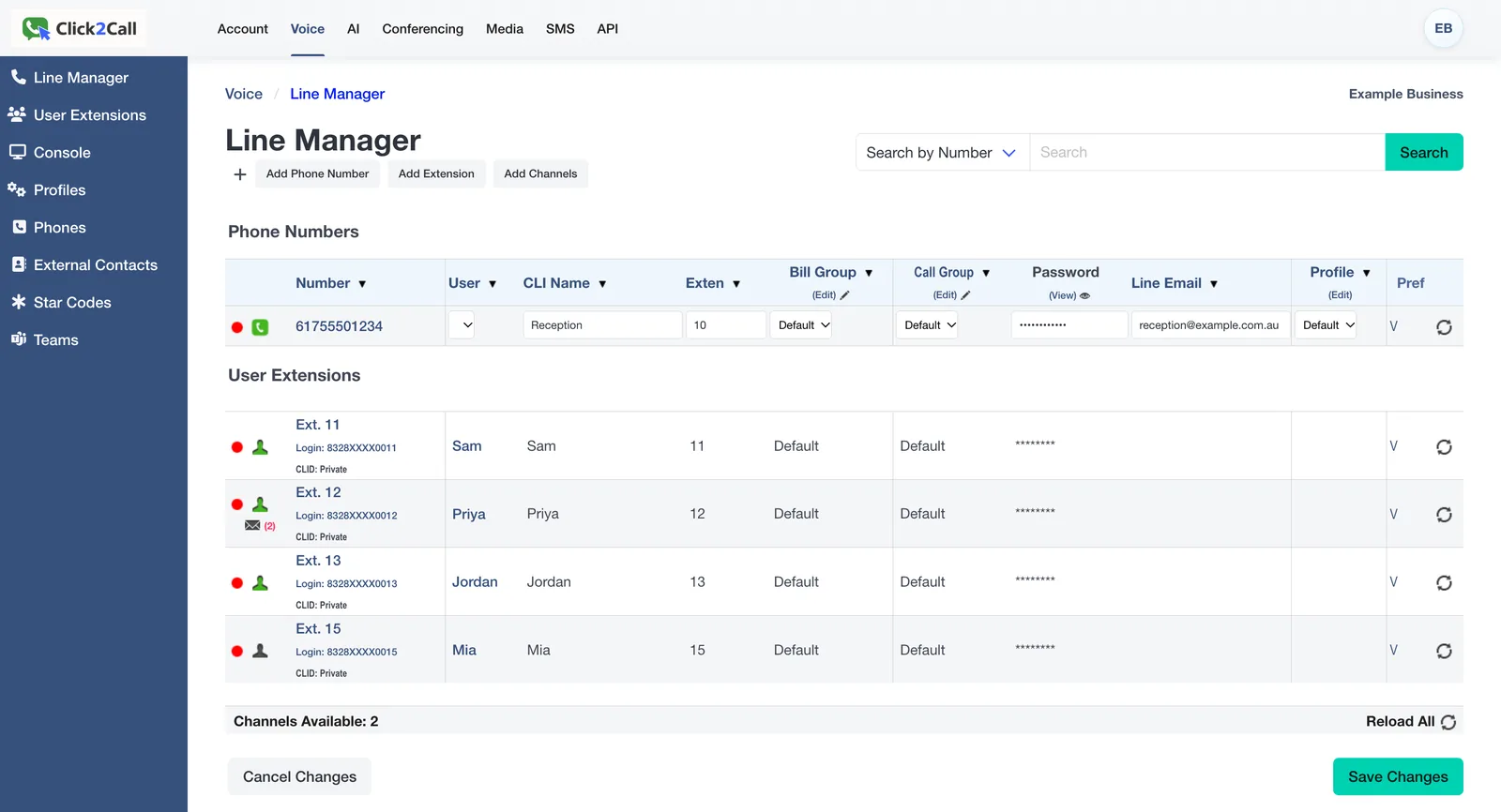
Manage Your Entire Phone System From One Dashboard
Add numbers, set up extensions, manage call routing, and view your account — all from a clean, browser-based portal. No software to install.
Add phone numbers instantly
Manage users and extensions
AI, conferencing, SMS and API in one place
Works on any device, any browser
portal.click2call.com.au
The Line Manager in the Click2Call portal (example account).
Built for Australian Businesses Like Yours
Click2Call works across every industry. Here is how businesses like yours use it every day.
Four worked examples of how a typical business could set up Click2Call, step by step, with what it would cost. They are illustrations built on real features and current prices, not customer stories. See all example setups.
Choose your user count, numbers, and setup options. Get an itemised cost breakdown you can share with your manager, finance team, or business partner — no sales call required.
Business VoIP (voice over internet protocol) runs your business phone calls over the internet instead of a copper phone line. Your number, extensions, voicemail and call routing live in the cloud, so staff can answer on a desk phone, a computer or a mobile app anywhere in Australia, and you manage everything online.
Is Click2Call a click-to-call button for websites?
No. Click2Call is an Australian business phone provider, not a website widget. The name is a brand. If you do want a click-to-call link on your site, the Click2Call call setup API rings your phone and then connects the caller with one web request. See the call setup API guide.
How much does a business phone system cost in Australia?
With Click2Call, each Cloud PBX user is $25 a month ex GST, including a local number, 300 outbound minutes and unlimited inbound calls. Extra calls are 10c a minute to landlines and 20c to mobiles. Porting a number is $100 including GST. There are no lock-in contracts. See pricing.
Where can I find setup guides and support?
The Click2Call Help Centre has step-by-step guides for every feature, from adding a desk phone or softphone to call queues, faxmail, SMS and connecting AI voice agents. The support page has a search box and an AI support chat, and Australian staff answer email.
Frequently Asked Questions About Click2Call
Straight answers to the questions business owners ask most.
Click2Call is an Australian business communications provider, trading as Bcom Services Pty Ltd (ABN: 92 636 893 108). We provide Cloud PBX phone systems, AI Voice Tools, AI Receptionist services, SIP Trunks, and Microsoft Teams Direct Routing to businesses of all sizes across Australia. Our platform replaces traditional on-premise phone hardware with a flexible, cloud-based system that is managed entirely online.
Yes. Click2Call serves businesses across all of Australia. Our services are delivered entirely over the internet, so there are no geographic restrictions. Whether you are in Sydney, Melbourne, Brisbane, Perth, Adelaide, Hobart, Darwin, or a regional area, you can use Click2Call with any standard NBN or business internet connection.
Cloud PBX Users are $25/month (ex GST) and include a local number and 300 minutes of outbound calling. SIP Trunks are $50/month (ex GST) and include 500 minutes of outbound calling. All prices ex GST. No lock-in contracts. See our full pricing page for details.
No special hardware is required. You can use Click2Call with a standard internet connection and a computer, smartphone, or tablet using our free softphone apps. If you prefer physical desk phones, we can supply and pre-configure compatible IP phones that plug straight into your network — no additional hardware or cabling required.
Yes. We support number porting for most Australian geographic numbers (02, 03, 07, 08), 13/1300/1800 numbers, and mobile numbers. The porting process typically takes 5 to 10 business days and your service continues uninterrupted during the transfer. Our team manages the entire porting process on your behalf.
Most businesses are up and running in under an hour with self-setup. You sign up online, configure your system through our web portal, and start making and receiving calls. For more complex setups with custom IVR menus, integrations, or large numbers of users, our team can assist and typically completes configuration within 2 to 3 business days.
Each simultaneous call requires approximately 100 Kbps of upload and download bandwidth. A standard NBN connection is more than sufficient for most businesses. For example, a 10-person office making 5 concurrent calls would need just 500 Kbps of dedicated bandwidth — a tiny fraction of a typical NBN 25 or NBN 50 plan.
No. Click2Call is month-to-month with no lock-in contracts — scale up, scale down, or cancel any time.
A 7-day free trial is available with $11 credit included — no credit card required. The credit activates one local landline number ($10) and covers a handful of test outbound calls. Inbound calls are free. Note: 1300 numbers aren't covered by the trial credit.
After the trial, keep the $10 number for inbound calls and add Cloud PBX User plans ($25/user/month) for staff who need to make outbound calls. Read the full free trial guide →
Support is provided by our Australian-based team via phone (1300 884 879), email (support@click2call.com.au), and our online support portal. We offer business hours support as standard. When you call us, you speak to someone in Australia who understands the local telecommunications environment.
A traditional phone system requires physical hardware installed on your premises, is expensive to maintain, and is difficult to scale. Click2Call is entirely cloud-based: there is no hardware to buy, no maintenance costs, and you can add or remove users in minutes from any web browser. You also get AI-powered features like automated receptionists, call transcription, and sentiment analysis that are simply not available on legacy systems — all at a fraction of the cost. See our full comparison →
Yes, Click2Call supports Microsoft Teams Direct Routing, enabling you to make and receive real phone calls directly within Microsoft Teams. This integration eliminates the need for a separate phone app or handset, streamlining communication and enhancing productivity within the Teams environment. See Microsoft Teams Calling →
Yes. Click2Call has built-in connection profiles for nine AI voice platforms — OpenAI, xAI, ElevenLabs, Retell AI, Synthflow, Vapi, LiveKit Cloud, Twilio and Cloudonix. Select the platform as the connection type on any Australian number, fill in the one field it needs, and inbound calls ring straight through to your agent. ElevenLabs, Retell, Synthflow and Vapi need no code at all; OpenAI and xAI require a webhook you host. Every call the agent answers is still recorded, transcribed and summarised by Click2Call. See all nine platforms →
No. Click2Call is an Australian Cloud PBX and VoIP provider operated by Bcom Services Pty Ltd. It is not a website click-to-call button. You can still add click-to-call to your own website or CRM using the Click2Call call setup API, which rings your phone first and then dials the customer.
Every feature has a step-by-step guide in the Click2Call Help Centre at click2call.com.au/help, covering phones and softphones, call flows, queues, faxmail, SMS, security and developer tools. The support page also has a search box and an AI support chat that answers from those guides.
Business VoIP runs your phone calls over the internet instead of a copper line. With Click2Call your numbers, extensions, voicemail and call routing are hosted in the cloud, so your team can answer on desk phones, computers or mobiles anywhere, and you manage everything from an online portal.
Whether you're a solo operator wanting a professional number, or a growing team replacing an old PABX — Click2Call has you covered. No hardware, no lock-in contracts, Australian support included.